3D × Annotations × QR × Application Link
Sharing Knowledge and Skills with XRLite
Beyond words and drawings, 3D speaks instantly. XRLite brings skills and knowledge to work
XRLite is a decision support platform that uses 3D as an entry point to seamlessly connect procedures, decision-making rationale, records, and external knowledge, accelerating and improving the accuracy of on-site decision-making.
Difficulty in passing down skills, leading to work becoming dependent on individuals
Manuals in paper or video form are hard to understand and follow
CAD data is often unavailable on site, or outdated and unusable
Workers need to switch back and forth between multiple apps and record systems for each step
XRLite solves them all!
1. No 3D CAD Data? No Problem.
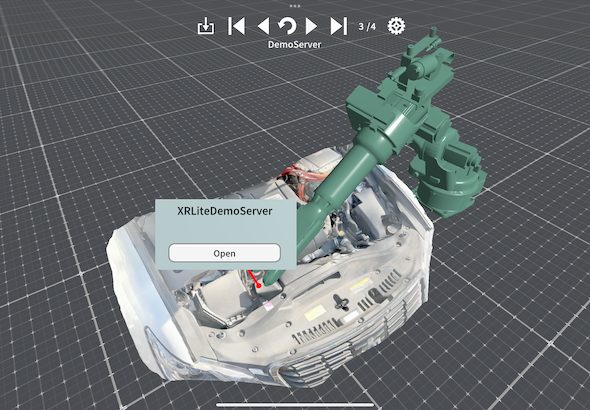
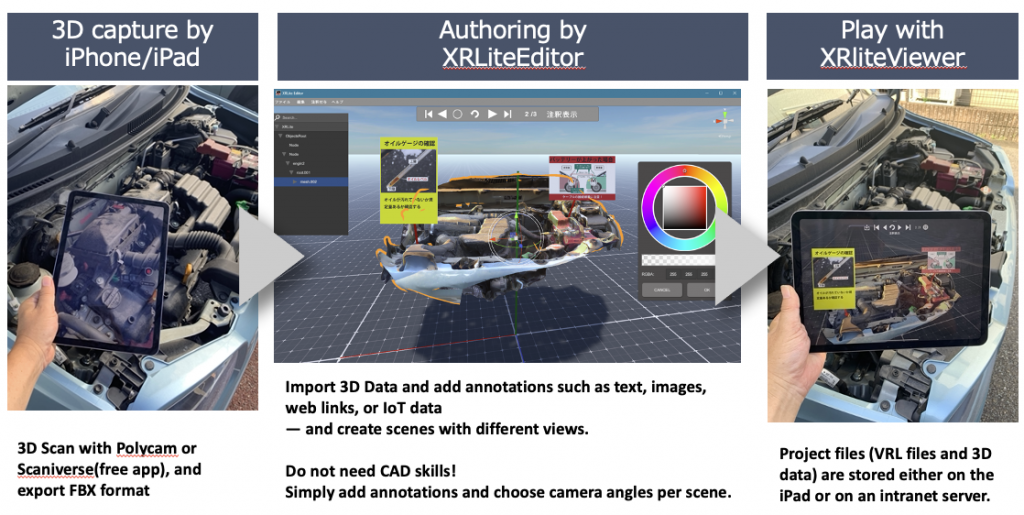
XRLite displays not only CAD data but also 3D scans by smartphones app. Existing facilities and older machines can be scanned with a smartphone 3D scanner and easily imported into XRLite.
2. Access all related documents with a single click
XRLite comes with built-in linking features to other apps and related documents.
From annotations on 3D models, you can link directly to PDFs, web pages, or even other applications. This makes it easy to access the information you need on the spot—minimizing delays in your work.
3. Operation Designed for On-site Use”
Just scan a QR code! Scan a launch QR code to display instantly—this simple operation makes on-site work smoother and more efficient.
Benefit
XRLite enables a workplace where anyone can perform maintenance work correctly and reliably. By extending equipment life, reducing downtime, and lowering training costs, it supports stronger competitiveness in manufacturing—making it an essential tool for the future of on-site operations.
Problem
Solution
Benefit
Facing new equipment with an unknown structure
Visualizing structures and maintenance points on a 3D model
Reducing the effort of work preparation
Unclear procedures lead to mistakes
Clarify procedures with annotations and animations
Prevent work mistakes and accidents
Training new employees takes time
Review and confirm in 3D as many times as needed
Improved training efficiency and reduced dependence on individuals
Supporting what is hard to understand, hard to convey, troublesome, and time-consuming—quickly with digital tools.
Product Overview: Inside XRLite
XRLite is a specialized tool for creating manuals and reproducing them on-site using 3D data. It consists of two applications:
XRLite Editor: Add annotations, camera angles, and button links to 3D models to create project files.
XRLite Viewer (iPad): Intuitively operate 3D scenes on-site with a simple UI that anyone can use right away.
Supported Formats: FBX / STL / OBJ / glTF2 / (Convert your 3D scans into supported formats to use them in XRLite.)
Use Cases
🏭 Maintenance Sites
Visualize maintenance points, so even unfamiliar equipment can be handled with confidence
Prevent missed inspections, standardize work procedures, and shorten task times
👨🏫 Education & Training
Use as a practical training tool simulating real on-site conditions
Reduce variations in teaching quality and accelerate skill acquisition
🧾 Integration with Digital Forms
Seamlessly link with tools like iReporter, PDFs, and web links
Streamline reporting and record-keeping
Want a demo or pricing details? Get in touch with us via the button below.