



AnnoLink
Turn everyday searches into organizational knowledge
See what was researched, what was learned, and what came next. Preserve insights and discoveries so they can benefit future work across the organization.
The documents exist. But the information you need was never captured in them.
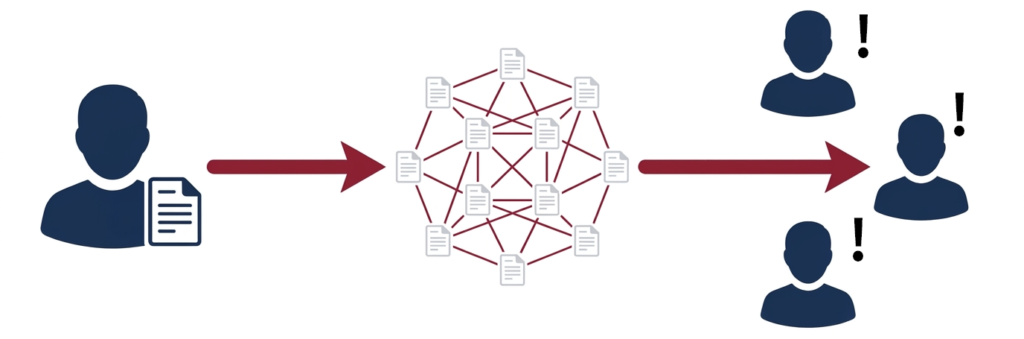
Don’t Let Critical Know-How Stay in People’s Heads
Do you find yourself relying on experienced employees for answers?
Do teams end up repeating the same investigations whenever responsibilities change?
AnnoLink is a knowledge management platform that helps organizations reduce dependency on individuals and support knowledge transfer by enabling users to search across technical documents, share investigation findings, and preserve connections between information.
Use Cases
Design Reviews
Search related drawings and documents, then record and share the rationale behind dimensions, specifications, and review checkpoints.
Equipment Troubleshooting
Investigate past failure reports and drawings, then capture insights, lessons learned, and important precautions discovered during root-cause analysis.
Knowledge Transfer
Gradually pass on expert investigation methods and information relationships through everyday work.
Turn Everyday Searches into Organizational Knowledge
Documents exist. Yet the information people actually need is often never captured within them.
AnnoLink enables users to add annotations to documents and save the relationships they discover as searchable investigation paths. These paths can be shared and reused across teams.
There is no need to organize document relationships in advance. By capturing knowledge generated during day-to-day work and applying it to future tasks, AnnoLink helps build processes that do not depend on individual employees.
What was researched. What was discovered. What was explored next.
Turn every investigation into knowledge the entire organization can reuse.
AnnoLink
Even when drawings, reports, and specifications are retained, the process behind them often is not. What was investigated, which pieces of information proved important, and what insights were gained are rarely captured.
AnnoLink helps preserve knowledge created during research by allowing users to search across documents, record insights and discoveries as annotations, and save the connections between search terms and reviewed documents as searchable investigation paths.
These investigation paths are visualized as network diagrams, making it easy to review how previous issues were explored, what information was connected, and what insights were uncovered.
The knowledge accumulated in this way can then be reused by individuals and teams alike, sparking new insights, discoveries, and solutions.
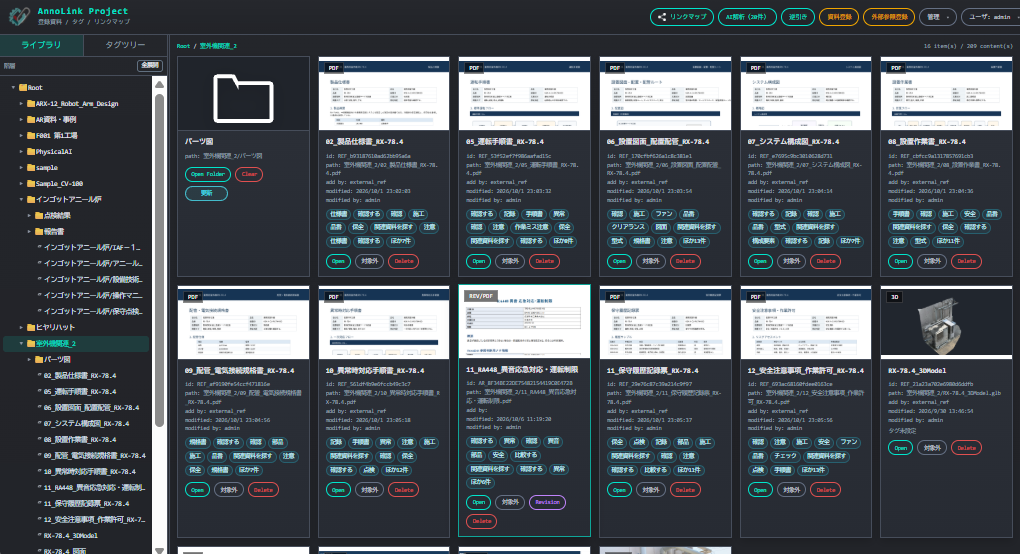
AnnoLink Project
Organize and manage documents on a project-by-project basis.
Group PDFs, images, 3D models, and other technical assets in one place, making project information easier to access and manage.
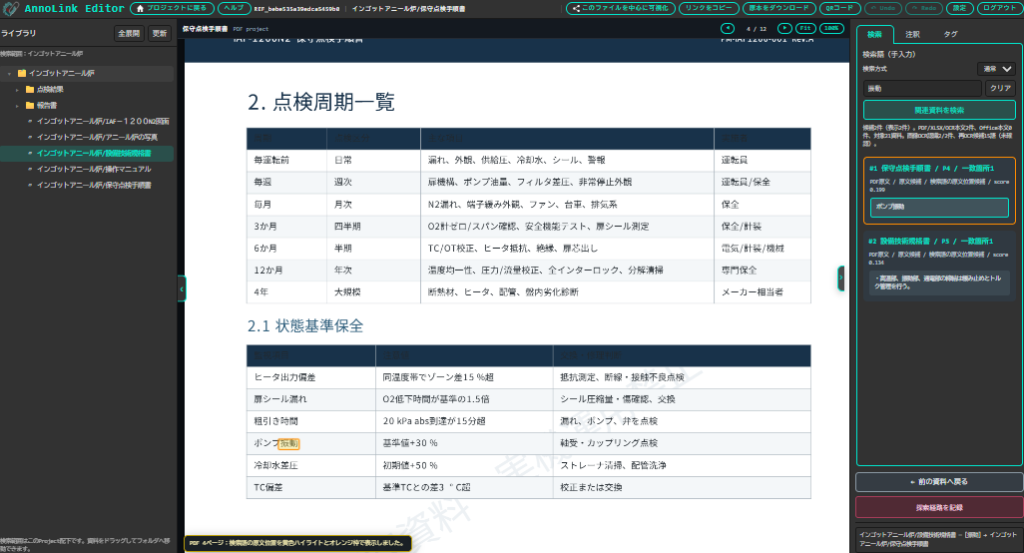
AnnoLink Editor
The main workspace for viewing drawings, photos, PDFs, and 3D models while adding annotations, descriptions, and related links.
Enter search keywords to find the information you need. Once you locate the relevant file, click “Record Investigation Path” to save your search process and discoveries.
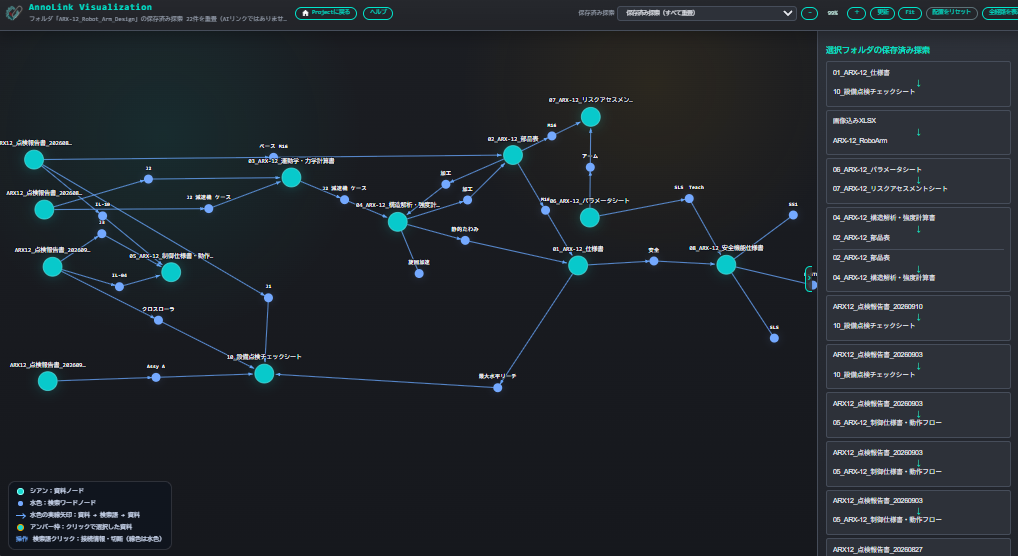
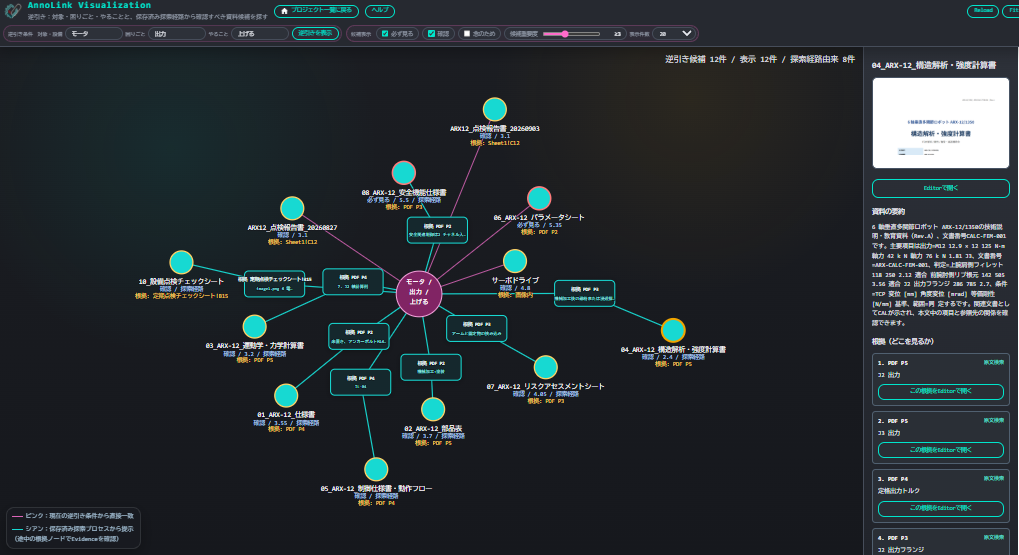
AnnoLink Visualization
Visualize users’ investigation paths as an interactive network diagram, showing the searches they performed and the documents they reviewed.
See what was researched, which documents were examined, and what was investigated next. By retracing these connections, teams can revisit the insights and discoveries gained from past investigations and apply them to future exploration.
Past discoveries become starting points for new insights.
。
AnnoLink Reverse Search
Search for relevant documents based on your objective by describing what the issue is, its current condition, and what you want to achieve.
Instead of relying solely on keywords, users can search from the perspective of their goal and situation. By specifying what is involved, its current state, and the desired outcome, AnnoLink helps identify the most relevant documents, past investigations, and accumulated knowledge.
Find information based on intent, not just keywords.

XRServer
A Windows-based server application that runs AnnoLink within your organization’s local network. The system can be deployed on-premises, enabling secure access to technical documents and accumulated knowledge across the organization.
What is AnnoLink
AnnoLink is a knowledge management system that enables users to search across existing technical documents, such as drawings, specifications, reports, and inspection records, while capturing, sharing, and reusing the insights and know-how gained through everyday work.
1. Cross-Document Search | Find the Information You Need
Even if you don’t know a file name or where a document is stored, you can search using investigation clues such as “belt,” “misalignment,” or “abnormal noise.”
Open related documents directly from the search results and review the relevant pages and original content. When you discover a new clue, you can continue your investigation from there.
2. Annotations | Capture Insights Where They Matter
As you review drawings, reports, and other documents, you can record important notes, decision rationales, and insights gained during your investigation as annotations linked directly to the relevant sections.
This allows organizations to preserve not only documents themselves, but also the knowledge required to use them effectively.
3. Investigation Paths | Preserve Connections Between Discoveries
During an investigation, one document may reveal a new keyword that leads to another document. AnnoLink allows you to save these valuable connections as Investigation Paths.
Saved paths are visualized as node graphs, making it easy to see what information was used as a clue and how users arrived at specific findings during previous investigations.
4. Knowledge Reuse | Apply Past Discoveries to Future Work
By leveraging accumulated annotations and investigation paths, users can revisit previous findings, related documents, and the clues that led to important discoveries.
Whether researching similar cases, implementing design changes, or troubleshooting equipment issues, AnnoLink helps organizations reuse existing knowledge, reduce redundant investigations, minimize dependence on individual expertise, and support knowledge transfer.
Start with Everyday Searches. Build Knowledge Over Time.
With AnnoLink, there is no need to organize all technical know-how in advance or manually map relationships between documents.
Simply search for information as part of your daily work, add annotations to important findings, and save valuable connections as investigation paths. Over time, these small contributions accumulate into a growing knowledge base that can be continuously reused across the organization.
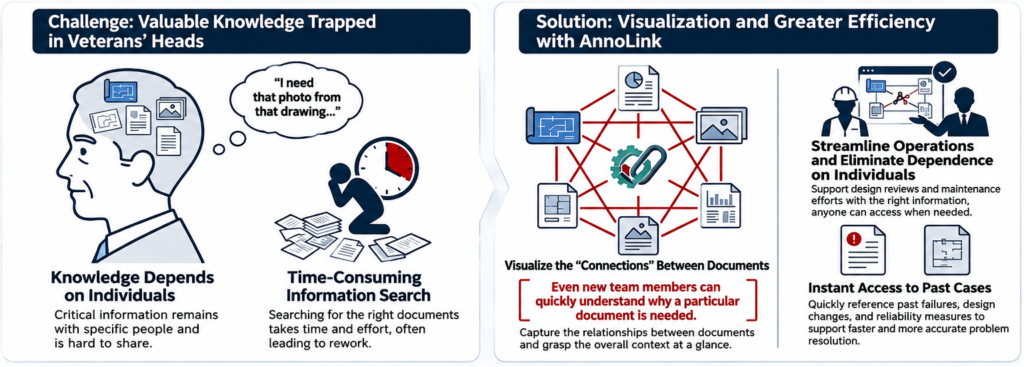
Use Case 1: Share Design Rationale Alongside Drawings and Related Documents
In design reviews, showing a drawing alone is often not enough. Engineers need to explain why a dimension was chosen, why a material was selected, and which specifications or past issues influenced the decision.
With AnnoLink, users can add annotations to specific locations in drawings, documents, images, and 3D models, making it easy to record design rationale and link related materials. This helps teams explain the background and supporting evidence while reviewing the relevant section.
Benefits
Design rationale can be reviewed and explained directly from the drawing, helping reviews proceed more smoothly and reducing the effort required to rediscover supporting documents later.
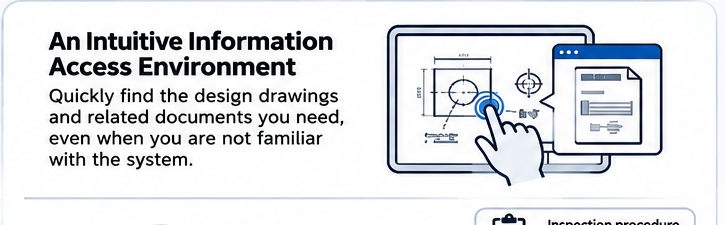
Use Case 2: Search by Objective, Symptoms, and Current Conditions
When equipment problems occur, finding the right documents can often take longer than the actual troubleshooting.
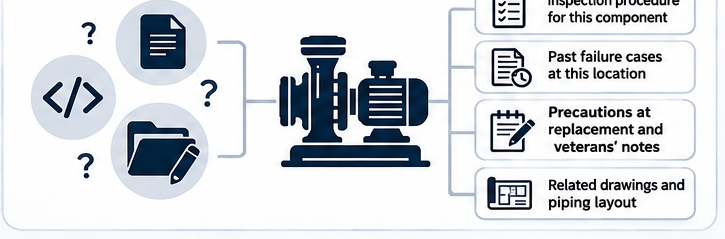
AnnoLink makes it easier to locate inspection procedures, past failure records, precautions, and related documents directly from equipment photos, drawings, and highlighted areas of interest. This helps teams respond more quickly during the initial stages of troubleshooting.
Benefits
Reduce the time spent searching for documents during equipment failures and quickly access the information needed to support effective troubleshooting.
Use Case 3: Preserve Changes, Key Considerations, and Related Documents for Knowledge Transfer
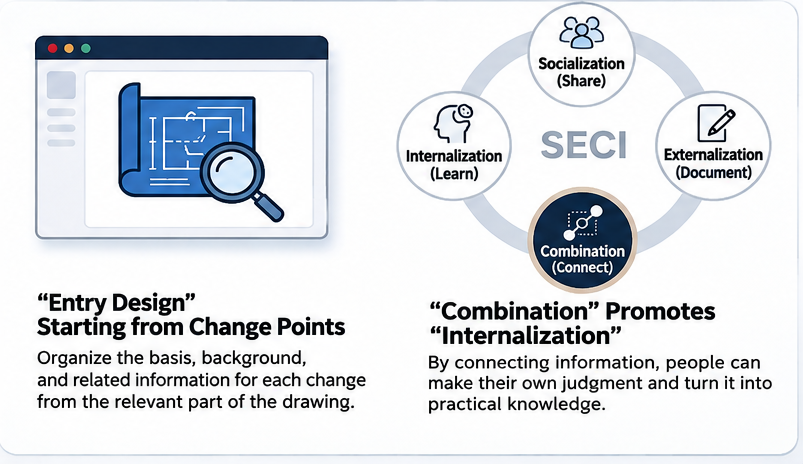
When sharing design or process changes, the challenge is often not the lack of documentation. The real issue is that the meaning and importance of critical changes are difficult for future team members to understand.
With AnnoLink, users can add explanations to changed or important sections and link them to related documents. This makes it easier for downstream teams, other departments, and future engineers to understand the context and intent behind the information.
Benefits
Important changes and considerations can be preserved in a way that remains understandable over time, helping reduce handover gaps and misunderstandings.
FAQ
Q. What is AnnoLink used for?
A. AnnoLink is a knowledge management system for manufacturers that helps organizations capture, share, and reuse technical know-how gained through everyday work.
Users can search across existing technical documents, including drawings, specifications, reports, and inspection records, to quickly find the information and supporting evidence they need. Notes, lessons learned, and important observations discovered during investigations can be recorded as annotations directly on relevant sections of documents. Connections between information found through the search process can also be saved as Investigation Paths.
Investigation Paths are visualized as node graphs, allowing users to review how previous investigations were conducted, what clues were used, and how specific documents and discoveries were connected.
There is no need to organize all technical knowledge or document relationships in advance. By simply searching, investigating, annotating, and saving valuable discoveries during daily work, organizations can gradually build a reusable knowledge base.
AnnoLink helps support design reviews, equipment maintenance, troubleshooting, knowledge transfer, and the reduction of knowledge silos, ensuring that valuable expertise remains accessible across the organization.
Q. How can AnnoLink be used in design reviews?
AnnoLink supports the entire design review process, from finding relevant information and verifying design rationale to capturing review findings and reusing engineering knowledge.
Users can search across drawings, specifications, past failure reports, meeting records, and other technical documents to investigate questions such as: Why was this dimension selected? Why was this material chosen? How were lessons from previous failures incorporated into the design?
Important findings, concerns, and action items identified during a review can be recorded as annotations directly on the relevant sections of drawings and documents. Users can also save the connections between related information as Investigation Paths, which can be shared and visualized as node graphs.
By preserving design rationale and review insights, AnnoLink helps organizations reuse engineering knowledge in future design changes and similar projects while reducing dependence on individual expertise.
How can AnnoLink be used in facility maintenance?
A. In facility maintenance, you can link specific parts of equipment photos, 2D drawings, PDFs, and 3D data directly to inspection procedures, past trouble records, parts lists, precautions, and instructional videos.
When equipment issues occur, this allows you to quickly locate essential information—such as which procedure manual to reference, whether similar issues occurred in the past, or which replacement parts are needed. By reducing time spent searching for documents or the right experts, AnnoLink supports faster initial response in maintenance operations.
Q. How does AnnoLink help eliminate reliance on specific individuals (knowledge silos)?
A. In manufacturing, knowledge individualization occurs not only when technical materials aren’t shared, but also when insights and judgment clues gained from past investigations remain with individuals and cannot be utilized by other team members.
With AnnoLink, you can search across drawings, specifications, reports, and inspection records, and record findings or precautions as annotations directly on specific parts of the documents. In addition, the information connections discovered during an investigation can be saved as a “search path” and shared using a node graph.
You do not need to organize or register all technical know-how in advance. Useful knowledge gained from daily operations can be accumulated step-by-step and reused for similar investigations, design changes, and troubleshooting.
By doing so, the methods for finding information and the clues for judgment—which previously relied on the experience and memory of specific individuals—can be shared across the organization. This helps reduce duplicate research, eliminate knowledge silos, and support skill transfer.
Q. How is AnnoLink different from Document Management Systems or PDM?
A. Document Management Systems (DMS) and Product Data Management (PDM) systems are primarily designed for storing documents and drawings, managing version control and access rights, and controlling product data.
In contrast, AnnoLink is a knowledge management system designed to accumulate, share, and reuse technical know-how gained during daily operations while using existing documentation.
You can perform cross-document searches across engineering drawings, specifications, reports, and inspection records, and record precautions or decision-making context found during investigations directly as annotations on specific parts of the files. Additionally, information connections discovered through research can be saved as a “search path” and viewed or shared using a node graph.
Managing documents and reusing the knowledge gained while investigating those documents serve two different purposes.
Rather than replacing Document Management Systems or PDM, AnnoLink complements them through the effective utilization of existing materials—supporting the accumulation and reuse of insights gained from design reviews, facility maintenance, and failure investigations.
Q. How is AnnoLink different from AI Search or RAG?
A. AI Search and RAG (Retrieval-Augmented Generation) are mechanisms that search for relevant information within internal documents and use Generative AI to provide answers to specific questions.
In contrast, AnnoLink is a knowledge management system designed to accumulate, share, and reuse insights and technical know-how gained while investigating documentation during daily operations.
You can perform cross-document searches across engineering drawings, specifications, reports, and inspection records, and attach cautionary notes or decision-making rationales found during investigations directly as annotations to specific locations in the documents.
Furthermore, the entire process—using one piece of information as a clue to search for another document and ultimately reach the necessary information—can be saved as a “search path.” Saved search paths are visualized using a node graph, allowing team members to reuse past investigation processes by seeing exactly what clues were used and which documents were verified.
While AI Search and RAG focus on “providing answers to questions,” AnnoLink focuses on “leveraging human-discovered insights gained during investigations for future operations.”
These two approaches are not in conflict. Teams can utilize AI for information retrieval and answer generation, alongside AnnoLink for accumulating annotations and search paths, depending on their specific business objectives.
Q. How is AnnoLink different from Obbligato AI or Windchill AI?
A. Systems like Obbligato and Windchill are PLM (Product Lifecycle Management) platforms designed to manage product data such as product structures, design changes, and engineering drawings. Integrating AI features into these platforms helps users search and utilize this accumulated product data.
In contrast, AnnoLink is a knowledge management system designed to accumulate, share, and reuse technical know-how gained during daily operations.
You can perform cross-document searches across existing materials—such as drawings, specifications, reports, and inspection records—and attach findings or cautionary notes discovered during investigations directly as annotations to specific locations in the documents. Additionally, information connections discovered through research can be saved as a “search path” and visualized or shared using a node graph.
While PLM platforms are responsible for managing product data, AnnoLink focuses on reusing the knowledge gained while investigating documentation for subsequent tasks, such as design reviews and failure investigations.
These two solutions are not mutually exclusive. They can be used together with distinct roles—for instance, referencing documentations managed within a PLM system while using AnnoLink to accumulate on-site findings and search paths during investigations.
Q. How is AnnoLink different from form digitization (form DX) tools?
A. Form DX tools primarily focus on data entry, recording, and aggregation.
AnnoLink, on the other hand, excels in scenarios where users need to view, explain, verify, and transfer knowledge.
Q. How is AnnoLink different from manual creation tools?
A. Manual creation tools primarily focus on creating new manuals from scratch.
AnnoLink, on the other hand, is designed to leverage your existing documentation while making it easier to search and use on-the-spot in daily operations.
Q. Is AnnoLink a VR/AR application?
A. No, AnnoLink is not a VR/AR application. However, we can customize it to meet your specific requirements, so please feel free to contact us for inquiries.
Q. Does it support DWG/DXF files?
A. Compatibility with DWG and DXF formats requires an optional feature module. Please contact us for details.
Q. Is AnnoLink an on-premises service?
A. Yes, it is.
Internal documents, design specifications, sales records, customer data, and facility details often contain highly confidential information that is difficult to store on external cloud environments.
AnnoLink supports on-premises deployment, allowing it to be installed and operated directly within your internal LAN or VPN environment.
It is ideal for organizing and sharing internal PDFs, images, 3D data, and links to web systems safely inside your local network.
For companies currently evaluating the balance between online AI, internal RAG, and offline environments, AnnoLink serves as an excellent starting point to organize, link, and turn existing documentation into actionable knowledge.
Q. Does AnnoLink compete with Microsoft SharePoint?
A. AnnoLink is not designed to replace SharePoint.
Microsoft SharePoint is a platform focused on supporting document sharing, collaboration, and access permission management within an organization.
In contrast, AnnoLink focuses on accumulating the insights and data connections discovered while searching technical documentation, turning them into reusable knowledge for daily operations.
You can perform cross-document searches across engineering drawings, specifications, and reports, and attach cautionary notes or investigative findings directly as annotations onto critical sections. Furthermore, the relationships discovered while using one piece of information as a clue to inspect another document can be saved as a “search path” and visualized or shared via a node graph.
There is no need to pre-organize all connections between documents in advance; useful knowledge is accumulated step-by-step through daily search and research activities.
While SharePoint supports document sharing and collaborative use, AnnoLink emphasizes the accumulation and reuse of knowledge derived during document research.
Both solutions can be used side-by-side depending on the objective. Note that direct integration with SharePoint requires verification based on your specific system environment and implementation requirements.
Q. What file formats are supported?
A. AnnoLink supports the following document, visual, and 3D file formats:
Documents & Spreadsheets: PDF, DOCX, XLSX, PPTX
Images: JPG, PNG
3D Models: GLB
(Note: Support for DWG/DXF formats is available as an optional module.)
System Cofiguration
AnnoLink is an on-premises application that runs on XRServer, which is installed within a local network (LAN) or VPN environment. Users access the system through a standard web browser.
XRServer Requirements
- Windows 11 (64-bit)
- Network connectivity (LAN or VPN environment)
AnnoLinkProject, AnnoLinkEditor, and AnnoLinkViz Requirements
- A modern web browser such as Google Chrome or Safari
- A mouse with a scroll wheel is recommended for efficient navigation and document review
Architecture
Server
- XRServer installed on a Windows PC within the organization’s LAN or VPN environment
Client
- Accessed through a web browser
- No dedicated client software installation required
This architecture enables teams to securely share and reuse technical documents, annotations, and accumulated knowledge within their existing network environment.
Struggling to capture and reuse technical know-how?
Discover how to leverage your existing drawings, reports, and technical documents to share and reuse the knowledge gained through everyday work.
Whether you’re looking to reduce dependence on individual expertise, support knowledge transfer, or improve design and maintenance processes, we can help you explore how AnnoLink can address your organization’s specific challenges.